EZ_fence
题考查 Base64 编码、栅栏加密。
下载好附件可以看到一张图片,并且题干上提示了 rar,可以知道图片内藏了一个压缩包,用 winhex 打开图片,搜索 rar 文件头 52 61 72 21 1A 07 01(从文件头可以看出这是一个加密后的压缩包),可以看到
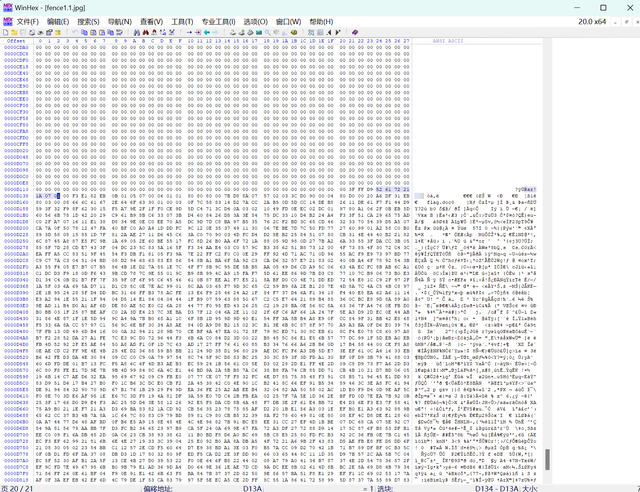
将文件头后剩余部分复制另存可以得到压缩包。
TIP
这里还有一个偷懒的方法,直接改变图片的后缀也可以得到压缩包。
再看图片内容是一串字符串,题目给了提示 fence 和数字 4,肯定使用了栏数为 4 的栅栏加密
python
def rail_fence_encrypt(plaintext, rails=4):
    """栅栏加密算法,将明文加密为栅栏密码"""
    if rails == 1:
        return plaintext

    # 创建rails个字符串列表
    rail_rows = [''] * rails
    current_rail = 0
    direction = 1  # 1表示向下移动,-1表示向上移动

    for char in plaintext:
        rail_rows[current_rail] += char
        # 改变方向(到达顶部或底部时)
        if current_rail == 0:
            direction = 1
        elif current_rail == rails - 1:
            direction = -1
        current_rail += direction

    # 连接所有行得到密文
    return ''.join(rail_rows)


def rail_fence_decrypt(ciphertext, rails=4):
    """栅栏解密算法,将栅栏密码解密为明文"""
    if rails == 1:
        return ciphertext

    length = len(ciphertext)
    # 计算每一行的字符数量
    counts = [0] * rails
    current_rail = 0
    direction = 1

    for _ in range(length):
        counts[current_rail] += 1
        if current_rail == 0:
            direction = 1
        elif current_rail == rails - 1:
            direction = -1
        current_rail += direction

    # 将密文分割到各个行
    rail_rows = []
    index = 0
    for count in counts:
        rail_rows.append(list(ciphertext[index:index+count]))
        index += count

    # 重建明文
    plaintext = []
    current_rail = 0
    direction = 1
    pointers = [0] * rails  # 记录每一行当前读取的位置

    for _ in range(length):
        plaintext.append(rail_rows[current_rail][pointers[current_rail]])
        pointers[current_rail] += 1

        # 改变方向
        if current_rail == 0:
            direction = 1
        elif current_rail == rails - 1:
            direction = -1
        current_rail += direction

    return ''.join(plaintext)


if __name__ == "__main__":
    # 给定的加密字符串
    encrypted_str = "rdh9zfwzSgoVA7GWtLPQJK=vwuZvjhvPyyvjnMWoSotB"
    rails = 4

    # 解密
    decrypted_str = rail_fence_decrypt(encrypted_str, rails)

    print(f"加密字符串: {encrypted_str}")
    print(f"解密后的字符串: {decrypted_str}")

    # 验证加密解密的一致性
    re_encrypted = rail_fence_encrypt(decrypted_str, rails)
    print(f"重新加密验证: {re_encrypted == encrypted_str}")
运行后可以得到解密后字符串 rSvMwgdouWZVhAvoj79GhSvWztPoyLfPytvQwJjBnKz= 明显是通过 base64 编码后的字符串
题干提示图片破损,需要修改图片高度,修改后可得到
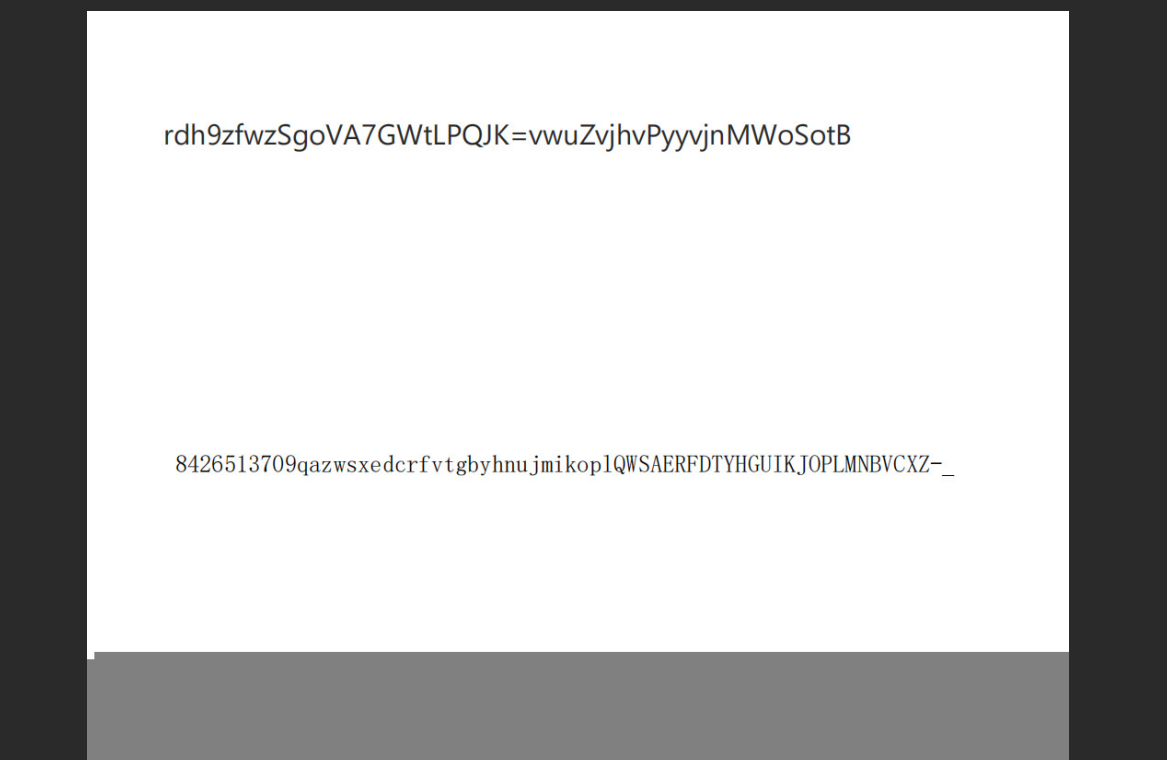
可以看出这是一个换表 base64,可以写出代码解密
python
import base64
def custom_base64_decode(encoded_str, custom_table):
    # 标准Base64字符表
    standard_table = "ABCDEFGHIJKLMNOPQRSTUVWXYZabcdefghijklmnopqrstuvwxyz0123456789+/"

    # 创建从自定义表到标准表的映射
    custom_to_standard = {custom_char: standard_char
                         for custom_char, standard_char in zip(custom_table, standard_table)}

    # 将自定义Base64字符串转换为标准Base64字符串
    standard_encoded = []
    for char in encoded_str:
        if char == '=':  # 处理填充字符
            standard_encoded.append('=')
        else:
            standard_encoded.append(custom_to_standard[char])
    standard_encoded_str = ''.join(standard_encoded)

    # 进行标准Base64解密
    decoded_bytes = base64.b64decode(standard_encoded_str)
    return decoded_bytes.decode('utf-8', errors='replace')

if __name__ == "__main__":
    # 加密后的字符串
    encrypted_str = "rSvMwgdouWZVhAvoj79GhSvWztPoyLfPytvQwJjBnKz="

    # 自定义字符表
    custom_table = "8426513709qazwsxedcrfvtgbyhnujmikoplQWSAERFDTYHGUIKJOPLMNBVCXZ-_"

    # 解密
    decrypted_str = custom_base64_decode(encrypted_str, custom_table)

    print("加密字符串:", encrypted_str)
    print("解密结果:", decrypted_str)
可以得到压缩包密码 New5tar_zjuatrojee1mage5eed77yo#。
输入后可以得到 flag{y0u_kn0w_ez_fence_tuzh0ng}。